
1. 简介
文本转语音(Text-to-Speech, TTS)技术可以将文本转换为自然流畅的语音输出。本指南将介绍如何使用FastAPI框架结合不同的TTS引擎构建Web服务,实现文本到语音的转换功能。
我们将主要介绍一种主流的TTS实现方案:
Edge-TTS - 基于微软Edge浏览器的在线TTS服务
此外,还有一种离线TTS方案可供选择:
Pyttsx3 - 本地离线TTS引擎
为什么选择FastAPI?
FastAPI是一个现代、快速(高性能)的Python Web框架,具有以下优势:
自动生成交互式API文档
强大的类型提示支持
异步编程支持
易于部署和扩展
2. 环境准备与安装部署
2.1 系统要求
Python 3.7+
pip包管理工具
支持的操作系统(Windows、Linux、macOS)
2.2 安装依赖
Edge-TTS方案
# 克隆项目或创建项目目录
mkdir fastapi-tts && cd fastapi-tts

# 创建虚拟环境(推荐)
python -m venv venv

source venv/bin/activate  # Linux/macOS
# 或
venv\Scripts\activate     # Windows

# 安装依赖
pip install fastapi uvicorn edge-tts python-multipart jinja2
2.3 项目结构
fastapi-tts/
├── fastapi-edge-tts.py      # Edge-TTS实现
├── templates/               # HTML模板目录
│   └── index.html          # Edge-TTS Web界面
├── requirements.txt         # Edge-TTS依赖
└── README.md               # 项目说明
3. 代码实现详解
3.1 Edge-TTS实现
核心代码分析
# fastapi-edge-tts.py 核心部分
from fastapi import FastAPI, HTTPException, Query, Request
from fastapi.responses import FileResponse, StreamingResponse, HTMLResponse
from fastapi.templating import Jinja2Templates
import edge_tts
import asyncio
import os
import tempfile

app = FastAPI(title="Edge TTS API")

# 设置模板
templates = Jinja2Templates(directory="templates")

# 定义请求体模型
class TTSRequest(BaseModel):
    text: str
    voice: Optional[str] = "zh-CN-XiaoxiaoNeural"
    rate: Optional[str] = "+0%"
    volume: Optional[str] = "+0%"
    pitch: Optional[str] = "+0Hz"
主要接口实现
获取语音列表接口
@app.get("/voices")
async def get_voices():
    """获取所有支持的语音列表"""
    try:
        voices = await edge_tts.list_voices()
        return voices
    except Exception as e:
        raise HTTPException(status_code=500, detail=f"获取语音列表时出错: {str(e)}")
文本转语音接口(POST)
@app.post("/tts")
async def text_to_speech(request: TTSRequest):
    if not request.text or not request.text.strip():
        raise HTTPException(status_code=400, detail="文本不能为空")

    try:
        # 创建临时文件
        temp_file = tempfile.NamedTemporaryFile(delete=False, suffix=".mp3")
        temp_file.close()

        # 配置TTS参数
        communicate = edge_tts.Communicate(
            text=request.text.strip(),
            voice=request.voice or "zh-CN-XiaoxiaoNeural",
            rate=request.rate or "+0%",
            volume=request.volume or "+0%",
            pitch=request.pitch or "+0Hz"
        )

        # 生成音频文件
        await communicate.save(temp_file.name)

        # 返回音频文件
        return FileResponse(
            temp_file.name,
            media_type="audio/mpeg",
            filename="tts_output.mp3"
        )
    except Exception as e:
        # 清理临时文件
        try:
            if 'temp_file' in locals():
                os.unlink(temp_file.name)
        except:
            pass
        raise HTTPException(status_code=500, detail=f"生成语音时出错: {str(e)}")
流式传输接口
@app.get("/tts/stream")
async def stream_tts(
    text: str = Query(..., description="要转换的文本"),
    voice: str = Query("zh-CN-XiaoxiaoNeural", description="语音名称"),
    rate: str = Query("+0%", description="语速"),
    volume: str = Query("+0%", description="音量"),
    pitch: str = Query("+0Hz", description="音调")
):
    async def generate():
        try:
            communicate = edge_tts.Communicate(
                text=text.strip(),
                voice=voice,
                rate=rate,
                volume=volume,
                pitch=pitch
            )
            async for chunk in communicate.stream():
                if chunk["type"] == "audio":
                    yield chunk["data"]
        except Exception as e:
            logger.error(f"流式传输过程中出错: {str(e)}")
            raise

    return StreamingResponse(
        generate(),
        media_type="audio/mpeg",
        headers={
            "Content-Disposition": "inline; filename=tts_output.mp3"
        }
    )
4. Web界面实现
4.1 Edge-TTS界面
<!-- templates/index.html -->
<!DOCTYPE html>
<html lang="zh-CN">
<head>
    <meta charset="UTF-8">
    <title>文本转语音服务</title>
    <style>
        /* 样式定义 */
        body {
            font-family: 'Segoe UI', Tahoma, Geneva, Verdana, sans-serif;
            max-width: 800px;
            margin: 0 auto;
            padding: 20px;
            background-color: #f5f5f5;
        }
        /* 更多样式... */
    </style>
</head>
<body>
    <div class="container">
        <h1>文本转语音服务</h1>
        <form id="ttsForm">
            <div class="form-group">
                <label for="text">输入文本:</label>
                <textarea id="text" name="text" placeholder="请输入要转换为语音的文本..." required></textarea>
            </div>

            <div class="form-group">
                <label for="voice">语音:</label>
                <select id="voice" name="voice">
                    <option value="zh-CN-XiaoxiaoNeural">中文女声 ( Xiaoxiao )</option>
                    <option value="zh-CN-YunyangNeural">中文男声 ( Yunyang )</option>
                    <option value="en-US-JennyNeural">英文女声 ( Jenny )</option>
                    <option value="en-US-GuyNeural">英文男声 ( Guy )</option>
                </select>
            </div>

            <div class="form-group">
                <label for="rate">语速:</label>
                <input type="range" id="rate" name="rate" min="-50" max="50" value="0" step="1">
                <span id="rateValue">0%</span>
            </div>

            <!-- 更多控件... -->

            <button type="submit" id="speakButton">阅读</button>
        </form>

        <div class="status" id="status"></div>

        <div class="audio-container hidden" id="audioContainer">
            <audio id="audioPlayer" controls autoplay></audio>
        </div>
    </div>

    <script>
        // 更新滑块值显示
        document.getElementById('rate').addEventListener('input', function() {
            document.getElementById('rateValue').textContent = this.value + '%';
        });

        // 表单提交处理
        document.getElementById('ttsForm').addEventListener('submit', function(e) {
            e.preventDefault();

            const text = document.getElementById('text').value.trim();
            if (!text) {
                showStatus('请输入要转换的文本', 'error');
                return;
            }

            const voice = document.getElementById('voice').value;
            const rate = document.getElementById('rate').value;
            // ... 获取其他参数 ...

            // 构造API URL
            const rateValue = (rate >= 0) ? `+${rate}%` : `${rate}%`;
            // ... 构造其他参数 ...
            const apiUrl = `/tts?text=${encodeURIComponent(text)}&voice=${encodeURIComponent(voice)}&rate=${encodeURIComponent(rateValue)}...`;

            // 显示请求的URL(调试用)
            console.log('请求URL:', apiUrl);

            // 禁用按钮并显示加载状态
            const speakButton = document.getElementById('speakButton');
            speakButton.disabled = true;
            showStatus('正在生成语音...', 'loading');

            // 隐藏之前的音频播放器
            document.getElementById('audioContainer').classList.add('hidden');

            // 调用API
            fetch(apiUrl)
                .then(response => {
                    if (!response.ok) {
                        return response.text().then(text => {
                            throw new Error(`HTTP ${response.status}: ${text}`);
                        });
                    }
                    return response.blob();
                })
                .then(blob => {
                    const audioUrl = URL.createObjectURL(blob);
                    const audioPlayer = document.getElementById('audioPlayer');
                    audioPlayer.src = audioUrl;
                    document.getElementById('audioContainer').classList.remove('hidden');
                    showStatus('语音生成成功!', 'success');
                })
                .catch(error => {
                    console.error('Error:', error);
                    showStatus('生成语音时出错: ' + error.message, 'error');
                })
                .finally(() => {
                    speakButton.disabled = false;
                });
        });

        function showStatus(message, type) {
            const statusElement = document.getElementById('status');
            statusElement.textContent = message;
            statusElement.className = 'status ' + type;
        }
    </script>
</body>
</html>
5. 运行测试
5.1 启动服务
Edge-TTS服务
# 启动Edge-TTS服务

python fastapi-edge-tts.py

# 服务将在 http://127.0.0.1:8000 启动
5.2 API测试
使用curl测试Edge-TTS
# 获取支持的语音列表
curl http://127.0.0.1:8000/voices

# 文本转语音(GET方式)
curl -X GET "http://127.0.0.1:8000/tts?text=你好世界&voice=zh-CN-XiaoxiaoNeural" -o output.mp3

# 文本转语音(POST方式)
curl -X POST "http://127.0.0.1:8000/tts" \
     -H "Content-Type: application/json" \
     -d '{"text":"你好世界","voice":"zh-CN-XiaoxiaoNeural"}' \
     -o output.mp3

# 流式传输
curl -X GET "http://127.0.0.1:8000/tts/stream?text=你好世界&voice=zh-CN-XiaoxiaoNeural" -o output.mp3
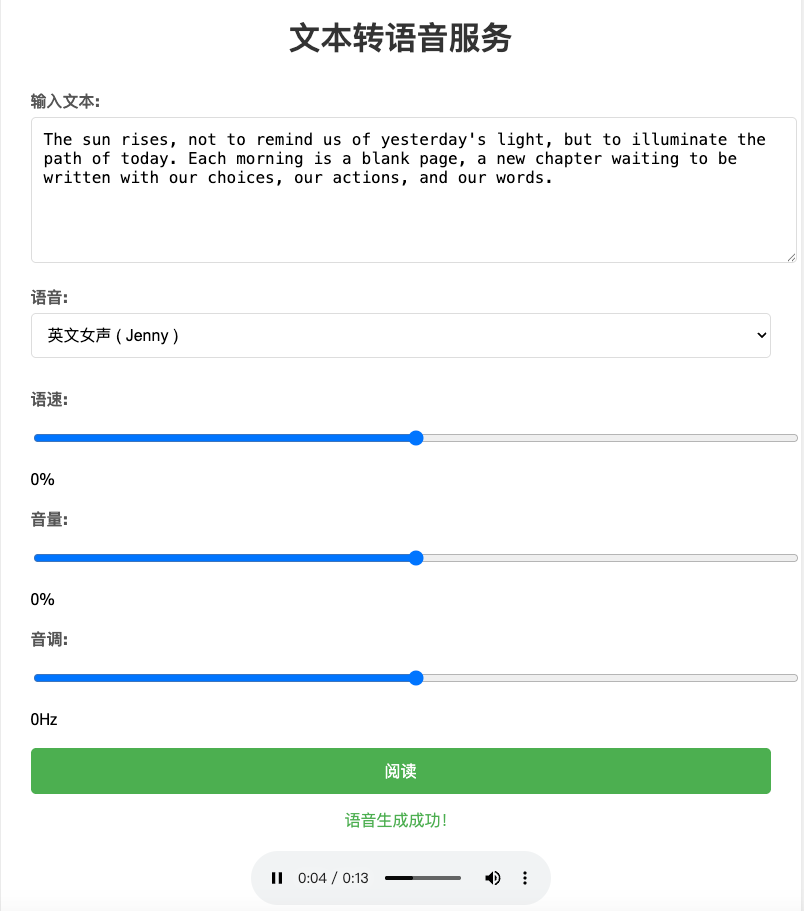
5.3 Web界面测试
打开浏览器访问 http://127.0.0.1:8000
输入要转换的文本
选择语音、调整语速、音量等参数
点击"阅读"按钮
等待语音生成并在播放器中播放
6. 常见问题及解决方案
6.1 Edge-TTS相关问题
问题1:SSL证书错误
ssl.SSLError: [SSL: CERTIFICATE_VERIFY_FAILED] certificate verify failed解决方案:
# macOS系统可能需要执行以下命令

/Applications/Python\ 3.x/Install\ Certificates.command
问题2:网络连接问题
aiohttp.client_exceptions.ClientConnectorError: Cannot connect to host解决方案:
检查网络连接
确保可以访问微软的服务
使用代理时需要正确配置
7. 性能优化建议
7.1 Edge-TTS优化
缓存常用语音
# 实现语音缓存机制,避免重复生成相同内容
from functools import lru_cache

@lru_cache(maxsize=128)
def cached_tts(text, voice, rate, volume, pitch):
    # TTS生成逻辑
    pass
异步处理
# 使用异步任务队列处理大量请求
from celery import Celery

@app.post("/tts/async")
async def async_text_to_speech(request: TTSRequest):
    # 将任务加入队列
    task = process_tts.delay(request.dict())
    return {"task_id": task.id}
8. 总结
本文详细介绍了如何使用FastAPI构建TTS服务,重点介绍了Edge-TTS实现方案。通过本指南,你应该能够:
理解TTS技术的基本原理
掌握FastAPI框架的基础用法
实现文本到语音的转换功能
构建友好的Web界面
处理常见问题和优化性能
Edge-TTS方案适合需要高质量语音、可以联网的场景。对于需要完全离线的场景,可以考虑使用pyttsx3方案,它是一个纯Python实现的TTS引擎,可以在没有网络连接的情况下工作,但语音质量可能不如在线方案。
无论选择哪种方案,都可以通过FastAPI的强大功能快速构建出功能完善的TTS服务。